Why measuring "your internet" is the wrong framing
Most network diagnostic tools open with something like: "How good is your internet?" Then they run a test and show you a number - download speed, ping, maybe jitter. And then you're supposed to know something about your connection.
The number tells you almost nothing useful. Here's why, and what a more honest measurement looks like.
"Your internet" is not a thing
Your internet is a collection of routes to a collection of destinations. When you run a speed test against one server, you're measuring one path, under one set of conditions, at one moment in time. That result doesn't generalize.
The same connection that gives you 5ms latency to Cloudflare's nearest edge might give you 180ms to a jsDelivr CDN node routed through a different carrier. Both results are real. Neither is "your internet." They're both "your connection toward a specific provider via a specific AS path."
When a tool shows you a single quality score or health rating, it's compressing a multi-dimensional routing problem into one number and presenting it as if the number means something universal. It doesn't. It means something specific - just not what the framing implies.
Network quality vs route quality
There's a distinction that most diagnostic tools quietly collapse, and it causes more confusion than people realize: network quality and route quality are not the same thing, and treating them as interchangeable means you often end up solving the wrong problem.
Network quality sounds like a property of your setup - your ISP, your router, your Wi-Fi, your connection type. Route quality is a property of a specific path from A to B. In practice, almost every "network quality" measurement is actually a route quality measurement in disguise.
What a speed test actually measures
When you send a request to a server, it doesn't travel through some abstract entity called "the internet." It travels through a specific chain of networks:

Every hop in that chain has its own latency contribution, its own congestion characteristics, and its own failure modes. The round-trip time you see at the end is the sum of all of them.
Here's what actually happens when you measure a connection:
- You send a request to an endpoint
- The request travels your ISP's network, across one or more AS paths, to the destination
- The destination responds
- You measure the round-trip time
That RTT is a property of: your ISP, the destination's ISP, the AS path between them, whether CDN anycast is in play, the time of day, congestion at any hop, and a dozen other factors. Changing any one of those changes the result.
[!NOTE] A problem in the middle - the inter-carrier link between your ISP and the destination's ISP - will show up as "bad network quality" even if your router, your ISP's local network, and your device are all functioning perfectly.
Why two servers in the same city can give wildly different results
This trips people up a lot. You ping two servers, both hosted in Mumbai, and one comes back at 12ms and the other at 140ms. Your instinct is that something's wrong. But there might be nothing wrong at all.
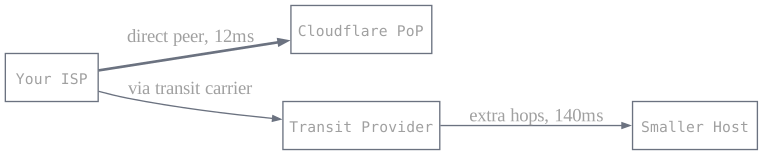
Each server's traffic enters the internet at a different point. One might be on Cloudflare's network, which has a point of presence close to your ISP's peering point. The other might be on a smaller hosting provider that routes through a different carrier, which your ISP reaches via a longer AS path - possibly through an international exchange. The physical distance is similar. The routing distance is completely different.
RTT is a routing measurement, not a geographic one. Two things that are close in space can be far apart in routing hops, and vice versa.
Measure the same connection at the same time toward three different endpoints - Cloudflare's edge, a public CDN, a self-hosted VPS - and you'll get three meaningfully different results. They're not contradicting each other. They're describing different routes.
Peering, transit, and why your ISP's relationships matter
ISPs connect to each other in two ways:
- Peering
- A direct connection between two networks, usually at an internet exchange point (IXP). Traffic between peers doesn't cross a third-party backbone - it goes directly. Fast and cheap for both parties.
- Transit
- When your ISP pays an upstream provider to carry traffic to destinations it can't reach directly. Transit adds hops, and sometimes those hops cross continents.
Whether your ISP peers directly with a destination's network - or has to route through one or more transit providers to get there - directly affects your latency. And you have no visibility into this as a user. You just see the RTT.
This is why your connection to Netflix might be great while your connection to a smaller SaaS tool feels sluggish. Netflix has paid for direct peering agreements with most major ISPs. The SaaS tool's hosting provider might be two transit hops away from yours.
Anycast makes this even more complicated
CDNs like Cloudflare, Fastly, and Akamai use anycast routing: the same IP address is announced from hundreds of locations simultaneously. When you send a packet to that IP, BGP routing delivers it to whichever announcement is "closest" from a routing perspective - not necessarily geographically closest.
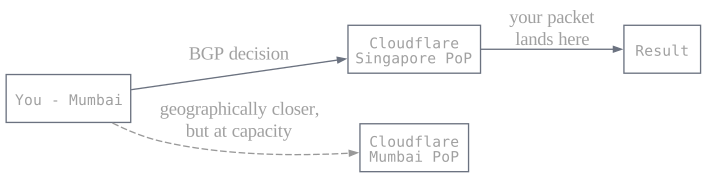
This means the latency you measure to a CDN is partly determined by the CDN's own traffic engineering decisions, not just your connection. If Cloudflare decides to route your traffic to their Singapore PoP instead of Mumbai - because of capacity, congestion, or internal load balancing - your RTT goes up. Nothing on your end changed. Your route did.
When measuring a CDN endpoint, a sudden latency increase might not be your ISP at all. It might be the CDN re-routing traffic at their end. Generic "network quality" tools have no way to surface this distinction.
Why the "internet speed" framing is actively misleading
The phrase "my internet speed" treats a complex routing topology as a single homogeneous property of your environment. It's a bit like saying "my road quality" to describe how fast you can get somewhere - the answer depends entirely on where you're going and which roads you take to get there.
Most tools lean into this imprecision because "internet quality" is intuitive and "RTT to a Cloudflare PoP via your ISP's upstream transit provider" is not. But the intuition comes at the cost of accuracy, and that cost shows up when people act on it.
When a tool tells you "your internet is degraded" based on a single measurement, what it's actually saying is: "your connection toward one specific endpoint was degraded at one specific moment." Acting on that as if it were a universal claim - switching ISPs, buying a new router, blaming your building's wiring - is how people spend money on interventions that don't address the actual problem.
The actual problem might be your ISP's peering relationship with a specific CDN. Or a BGP path change that happened last week. Or the CDN re-routing you to a more distant point of presence due to capacity. None of those are fixed by replacing your router.
What this means for debugging
When something feels slow, the cause is usually one of:
- Your ISP's local network (your router, your line)
- Your ISP's inter-carrier link to a specific destination's network
- The CDN or hosting provider's routing decisions
- BGP path changes that nobody announced
The first one is something you can act on - restart your router, call your ISP. The rest are outside your control, and the fix is either waiting, switching providers, or choosing a different endpoint.
A single speed test or ping can't tell you which category you're in. It just gives you a number. If you measure toward one endpoint and it's slow, you don't know if it's slow to everything or slow to that specific route. Measuring toward multiple endpoints - providers you actually care about - is the only way to separate "my connection is degraded" from "this specific route is degraded right now."
What a more honest measurement looks like
If a single endpoint measurement is too narrow, the obvious fix is to measure toward multiple endpoints - and to interpret each result against that endpoint's own baseline, not a universal "good/bad" threshold.
150ms RTT to Cloudflare is elevated. 150ms RTT to a CDN node that routes international traffic through Singapore is perfectly normal. The same number means different things depending on the route. A tool that scores both against the same threshold isn't measuring - it's guessing.
This is what I've been building toward with libreprobe. The Stability page doesn't ask "is your internet good?" It measures your connection toward a set of specific provider endpoints and scores each result against that provider's own baseline.
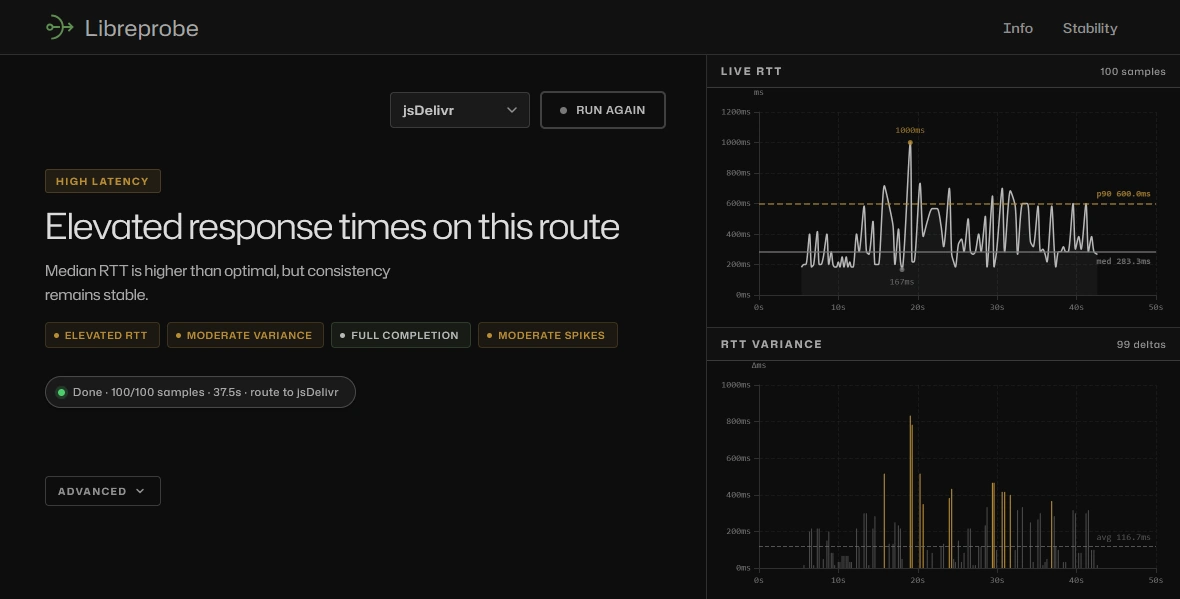
The question it answers is "how is my connection to this specific route right now?" - which is the question you actually have when a particular service feels slow. If you know your route to Cloudflare is fine but your route to jsDelivr is consistently elevated, the problem is routing between your ISP and jsDelivr's network - not your connection generally. You're not going to fix that by restarting your router. You might fix it by using a different CDN, switching DNS resolvers, or just knowing it's not your end and moving on.
[!NOTE] A generic "internet quality" score would never surface that distinction. It would average everything together and tell you your internet is okay or not okay - leaving you no closer to understanding why.
"Your internet" is a convenient fiction. What you actually have is routes to destinations. The only honest measurement is one that treats them as separate things.