My SSD suddenly scared me out...
Following a SMART failure from BIOS to firmware (and accidentally rebuilding my own monitoring tool)
"Drive failure expected in less than 24 hours. SAVE ALL DATA."
Most people never expect to read those words outside of a horror story. Mine appeared in a terminal window on an ordinary afternoon.
Like most people, I Googled it and got fifty different answers. Some said the drive was already dead. Some claimed SMART couldn't be trusted. None of them answered the question I actually cared about: Is my SSD actually dying?
I don't like unanswered questions. So I started digging.
Chapter 1 - It didn't start with a BIOS warning
People assume hardware failures begin dramatically. Mine started with Windows just... stalling.
I'd log in, the wallpaper would load, and then nothing. No desktop, no icons, just vibes. Back to the lock screen. Tried again - same thing. On the third attempt it finally loaded, like nothing had happened, daring me to prove otherwise.
The rest of the day everything worked fine. But I don't trust "Windows being Windows" as a diagnosis, so I opened Event Viewer - the digital equivalent of reading someone's diary to figure out why they've been acting weird.
Event ID 7.
The device, \Device\Harddisk0\DR0, has a bad block.
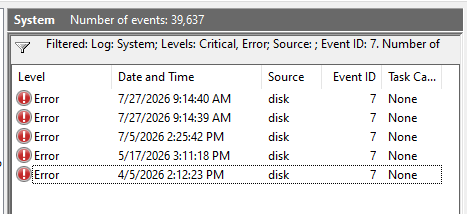
Not a one-off, either. The timestamps went back months - April, May, July. Windows had been quietly filing incident reports on my drive for a while, and I'd just never checked the mailbox.
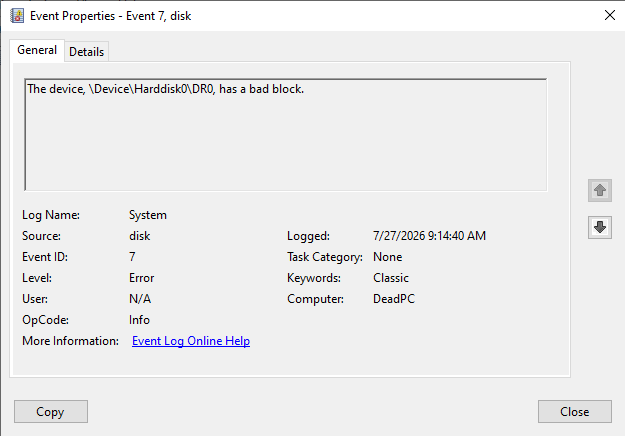
Suddenly the login stall looked less like a fluke and more like a drive struggling to read something, failing, and eventually muscling through on retry. I couldn't prove it yet - but I had a suspect.
I had no idea the firmware was about to back me up less than 24 hours later.
Chapter 2 - The firmware joins the conversation
I went to bed with no real conclusions. The laptop had other plans.
The next morning I hit the power button and got a black screen before Windows even had the decency to try loading: SMART Hard Disk Error (301).
Firmware doesn't do dramatics. It doesn't crash like an app or hang like a driver - it just sits underneath everything, quietly running the show. So when it speaks up, it means it. No percentages, no breakdown, just "301" and a polite suggestion to back up and buy a new drive.
Now I had two witnesses that had never met each other - months of Windows event logs, and a firmware warning that appeared out of nowhere - both pointing the same direction. That was enough to stop guessing and start measuring.
I reached for smartctl, which has all the bedside manner of a doctor reading you your own MRI results without context.
SMART overall-health self-assessment test result: FAILED!
Drive failure expected in less than 24 hours. SAVE ALL DATA.
Cool. Cool cool cool.
Except the laptop wasn't acting like it was dying. Windows booted fine. Apps opened fine. If the SSD was on its deathbed, it was doing a suspiciously good job hiding it. Either it was faking wellness like a cat that doesn't want to go to the vet, or I was misreading what "FAILED" even meant - and that question ate the next several days.
Chapter 3 - The rabbit hole called SMART
Before this, SMART was one of those acronyms I'd scrolled past a hundred times without registering - CrystalDiskInfo shows it, Windows shows fragments of it, everyone just assumes it's Doing Something Smart.
Turns out SMART - Self-Monitoring, Analysis and Reporting Technology - is just a drive keeping a diary of its own vitals: power-on hours, temperature, bad sectors, failed reads. It doesn't judge. It just counts.
Skip the friendly UI and you get this:
ID   Attribute                      Raw Value
------------------------------------------------
5    Reallocated Sector Count       41
196  Reallocation Event Count       32
197  Current Pending Sector         41
198  Offline Uncorrectable          32
199  UDMA CRC Error Count           1
No units, no context, no vibes - just numbers, like a report card with the grading scale torn off.
- Reallocated Sector Count
- The SSD quietly swapping bad blocks for spares - self-healing, basically. Mine had done it 41 times, which is either "totally normal" or "please see a doctor," depending who you ask.
- Current Pending Sector
- Scarier: blocks the drive isn't sure about yet. Mine sat at 41 too - suddenly those Event ID 7 messages made a lot more sense.
- Offline Uncorrectable
- The drive admitting defeat: 32 blocks it already gave up on. At this point the BIOS warning was just reading the room.
None of these numbers came with a verdict - no "replace now," no color coding, just raw evidence. Everything you see in CrystalDiskInfo's badges and percentages is someone else's opinion layered on top of these same five counters. And that opinion turned out to vary wildly depending who you asked: CrystalDiskInfo said Good (98%). smartctl said FAILED. HP said Error 301.
Chapter 4 - Three tools, three stories
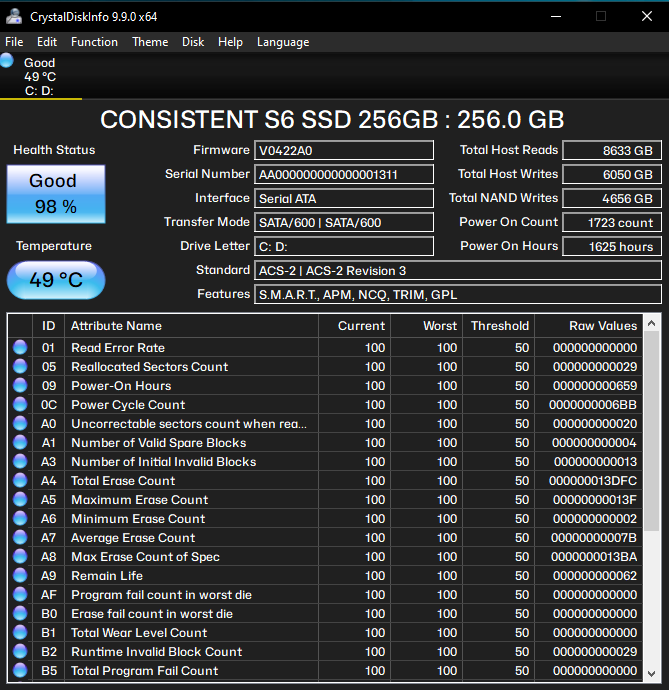
Somehow my SSD was simultaneously dying and thriving, which is a very millennial way for a piece of hardware to behave.
Turns out none of the three tools were lying - they just don't grade on the same curve. HP's firmware has its own failure threshold. smartctl just reports that verdict verbatim. CrystalDiskInfo, meanwhile, was still looking at raw endurance, which hadn't budged from 98%.
A shiny UI can make software look a lot smarter than it is. Peel back the graphs and everyone's reading from the same five counters - they just disagree on how scared you should be.
Which raised the real question: if all I cared about was whether those numbers changed, did I need a whole monitoring suite? Or just something that shut up unless there was actual news?
Chapter 5 - Two days of waiting
Drive failure expected in less than 24 hours. SAVE ALL DATA.
Hard to unread that.
For two days I treated the laptop like a sleeping dog you don't want to startle. Should I finish this coding session? Should I let Windows Update reboot it? Should I even breathe near it? Questions I never thought I'd take seriously.
First move: back up everything - projects, documents, photos, configs, anything I'd cry over losing. Watching the progress bar felt less like a backup and more like an evacuation.
Backup done. Worst case now cost me hardware, not memories.
Then... nothing happened. Day one, no change. Day two, same SMART numbers, down to the sector. The drive had failed its health check but apparently didn't get the memo about dying on schedule.
Turns out degraded and rapidly deteriorating are not the same thing - a distinction I learned the hard way, by white-knuckling a laptop that was, in fact, fine. What I actually wanted the whole time was one question answered daily:
Did anything change today?
Chapter 6 - MonSMART
I kept mentally diffing screenshots - was it 41 yesterday, or 40? At some point I realized I didn't care about the current state, only the delta. So I spent an evening building on a tiny utility I'd already started, shaping it into something that answered one question: did anything get worse today?
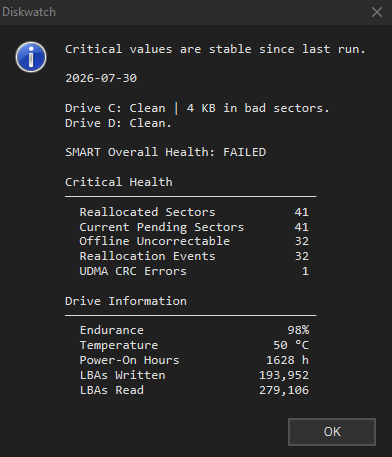
Version one was ugly - just JSON dumps diffed against yesterday's. Very "debugging script that escaped containment," not "program." But over a few days it grew up: it started checking filesystem health, grouping the attributes that mattered, and - critically - shutting up when there was nothing to report.
Eventually it stopped screaming "SMART: FAILED" and started calmly saying "Critical values are stable since the previous scan." That tone shift was the whole lesson: a failed status tells you there's a problem. A comparison tells you whether it's getting worse. MonSMART (formerly Diskwatch) exists because I got tired of doing that math by hand.
Chapter 7 - What I actually learned
smartctl told me I had 24 hours. I took that as gospel for about a day, then the SSD blew right past the deadline like it hadn't read its own diagnosis. Diagnostics are evidence, not prophecy - the warning justified a backup, not a countdown timer.
Looking back, the chain mattered more than any single clue. Ignore the login glitch, and I never open Event Viewer. Ignore Event Viewer, and I never see months of bad blocks. Ignore the BIOS, and I never run SMART at all. No single piece proved anything - together they were impossible to argue with. That's most of troubleshooting: three different witnesses telling the same story.
It also taught me something about my own tooling. MonSMART was fine for a quick health check. It took an actually dying drive to show me it needed history and context, not more buttons - the same way you don't find out your umbrella has a hole until it's already raining.
If you're ever staring down a similar warning: back up first, investigate second. Hardware is replaceable. Your family photos are not.
The laptop's still alive as I write this. SMART still says FAILED. MonSMART still checks in every day, like a nurse doing rounds on a patient who refuses to either recover or die. Maybe it has weeks left, maybe months - I genuinely don't know, and for once I'm at peace with not knowing. Not bad, for something that started with Windows taking an extra six seconds to load a wallpaper.
Update: the saga continued - Pablo #1: My SSD Started Snitching on Itself opens the full five-part retrospective.