I just wanted portable Python :(
Every developer eventually accumulates a folder full of tools. Mine lives on D:\DevEnv - git, Node.js, Python, editors, scripts, utilities. If Windows dies tomorrow, I want to copy one folder onto another machine, adjust a few PATH entries, and get back to work. No installers, no registry archaeology, no MSI silent writes into Program Files.
That philosophy worked fine for Node.js. Python had other plans.
Portable Node.js set the wrong expectation
Months earlier, npm had silently corrupted itself. Running npm -v produced pages of stack traces about missing internal dependencies - not packages I'd installed, but npm's own modules. The installation itself had rotted.
I asked ChatGPT what the cleanest fix was and it suggested the standalone binary (ZIP) approach. I downloaded it from nodejs.org, extracted into D:\DevEnv\node\runtime, created isolated directories for cache, config, and global executables, pointed PATH where I wanted it, and never looked back. npm accepted custom paths without complaint.
D:\DevEnv\node\
├── runtime\
├── cache\
├── global\
└── config\
After living with that for months, I unknowingly developed an assumption: surely Python can be made to work the same way. I asked ChatGPT how to set up a portable Python on Windows.
The wrong path (take one)
ChatGPT's first answer was the official Windows installer with a custom target directory. Point it at D:\DevEnv\python\runtime and walk away. For a while that sounded reasonable.
Then I thought about it more. If I'm using an installer, am I actually building a portable environment? Installers don't just copy files - they register things, write metadata, integrate with Windows. I asked ChatGPT whether an installer-based setup actually counts as portable. It conceded the point: what I wanted wasn't a Windows installation that happened to live on another drive. I wanted a folder I could delete without an uninstaller.
Strike one.
The wrong path (take two)
ChatGPT then suggested the embeddable package - a ZIP, no installer, no registry. Exactly what I wanted, or so I thought. I asked it to explain what the embeddable package was actually designed for, and it walked me through the docs: it's for embedding inside another application, not for use as a developer runtime. Getting pip working requires editing python314._pth, disabling isolation, enabling imports manually, and repeating those hacks on every update.
Could I force it into a normal development environment? Absolutely. Should I? I asked ChatGPT whether that was a good idea. It agreed it wasn't - I'd just be replacing one problem with another.
Strike two.
python-build-standalone
At this point I asked ChatGPT directly: is there any way to get a truly portable Python on Windows that I can just delete when I'm done? This time it mentioned a project called python-build-standalone - complete standalone builds with no installer, no wizard, no registry. Just an archive.
I didn't trust it yet. I opened up my terminal and:
certutil -hashfile cpython-3.14.6+20260623-x86_64-pc-windows-msvc-install_only.tar.gz SHA256
Hash matched. I extracted it. Inside was exactly what I wanted to see:
python\
├── DLLs\
├── include\
├── Lib\
├── libs\
├── Scripts\
├── python.exe
└── ...
Renamed the top-level directory to D:\DevEnv\python\runtime and ran the simplest possible test:
D:\DevEnv\python\runtime\python.exe -V

Python 3.14.6
Then:
D:\DevEnv\python\runtime\python.exe -m pip --version

pip 26.1.2 ...
Both worked. I wired the runtime into PATH, opened a new terminal, and typed the test that mattered:
pip -V
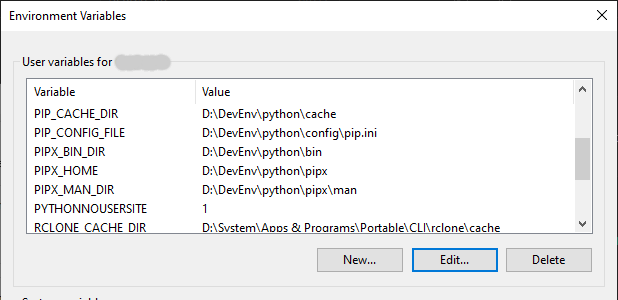
Windows answered: 'pip' is not recognized as an internal or external command.
The missing pip.exe
Inside Scripts\ was a single .empty file. No pip.exe, no pip3.exe. I asked ChatGPT why - it initially guessed the installer normally generates launcher executables. We went back and forth a bit, but the real answer was simpler: the standalone build ships the Python module but doesn't include launcher shims because those are normally created by the Windows installer. The package manager existed; its shortcut didn't.
ChatGPT initially suggested running ensurepip to regenerate the launcher. I almost went along with it. Then I stopped and asked: do I actually need pip.exe? I already had a perfectly good launcher:
python -m pip
So instead of manufacturing a launcher, I created a wrapper:
@echo off
"D:\DevEnv\python\runtime\python.exe" -m pip %*
Saved as D:\DevEnv\python\bin\pip.cmd, added bin to PATH. Done.
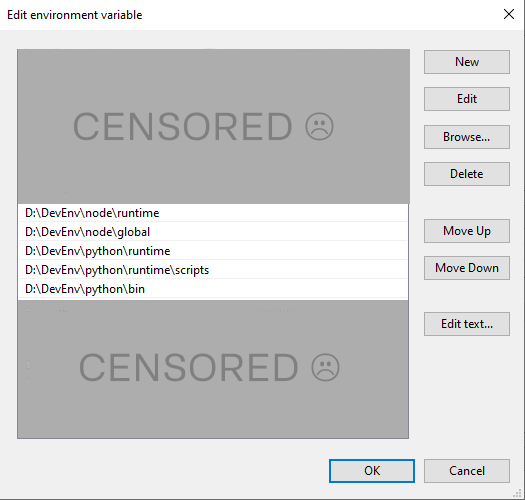
This turned out to be the cleaner solution anyway. Every pip invocation is now explicitly tied to my runtime instead of whatever launcher happens to exist on the system. It was a deliberate choice that made the setup more predictable.
The methodical part the draft usually skips
The conversation wasn't a straight line from "pip doesn't work" to "here's the fix." We stopped to inspect the environment at every step instead of assuming things. Before installing anything, we verified:
- Where
pythonandpipactually resolve - What's inside the
Scriptsdirectory - Whether
ensurepipis available - That
cache.pyexists in the expected location - That
python -m pipworks end to end - What
pip config debugactually shows - That PATH entries point to the right directories
- Whether
PYTHONNOUSERSITE=1changes anything
I fed ChatGPT terminal output after every check. It guessed wrong a few times - it briefly thought the standalone build should have pip.exe, it initially suggested ensurepip, and at one point it confidently told me to check pip cache verify which pip doesn't even support (that was its npm brain leaking). But because I kept pasting actual output instead of taking its word for it, we caught each mistake and adjusted course.
Two stupid bugs (ChatGPT's and mine)
While writing pip.cmd, ChatGPT generated the batch file with %%* instead of %*. Every command became:
python -m pip %*
literally - not expanding arguments, passing the literal string %*. So pip config debug turned into python -m pip %*, which produced nonsense errors. I didn't catch it because batch escaping is opaque unless you stare at it long enough. ChatGPT didn't catch it either. I only noticed when I checked what was actually being passed to python.
The fix took five seconds. The root cause was that neither of us had tested the wrapper before running it - we both assumed batch file generation was trivial enough to skip verification.
Why pipx exists
For months I had been treating pipx like Python's version of npx. When I first asked ChatGPT about this, it confirmed the analogy without questioning it. But something still felt off about how Python packaging actually worked, so I kept asking.
So I asked: "If pip installs packages into the current interpreter... then why does pipx exist?"
ChatGPT walked me through what actually happens behind the scenes. pipx doesn't replace pip - it automates it. It creates an isolated virtual environment, runs pip install inside it, and exposes the executable on PATH. Every application gets its own environment; nothing leaks into anything else. Remove one and nothing else notices.
That's not what npx does. The analogy I'd been using was actively misleading.
The real mapping:
npm install  →  pip install
npx          →  pipx run
npm install -g  →  pipx install
pip installs packages into whatever Python environment owns that pip - the base interpreter, a venv, a CI container. It doesn't care which. venv creates environments. pipx is an application manager that internally creates a venv and delegates the actual install to pip.
Base Python
    ├── pip    →  installs into an environment
    ├── venv   →  creates environments
    └── pipx   →  creates venv → pip → exposes CLI
Understanding that distinction was the actual turning point of this entire project. It made months of confusing behavior suddenly obvious.
The final test
Theory is nice. I wanted proof - not cowsay, something I actually use.
pipx install formseal-fetch
A few seconds later:
installed package formseal-fetch
These apps are now available:
    fsf.exe
fsf
The CLI started immediately. That single command verified the standalone runtime worked, pip worked, pipx worked, PATH was correct, executable shims worked, virtual environments were being created correctly, and my own application still behaved as expected.
Then I removed it:
pipx uninstall formseal-fetch
Gone. No leftover dependencies, no mysterious packages in the base interpreter, no cleanup. Exactly what I'd wanted from day one.
The rules I ended up with
I started looking for a portable installation. I ended up with a completely different way of thinking about Python. ChatGPT helped me synthesize these into rules that actually stuck - and I wouldn't have landed on them without the dead ends first. The wrong paths were as instructive as the right one.
Base Python exists to bootstrap the ecosystem. It contains Python, pip, pipx - nothing else unless there's a very good reason.
CLI applications belong to pipx. Each gets its own environment. Each can disappear independently.
pipx install black
pipx install ruff
pipx install formseal-fetch
Projects own their own dependencies. Working on a repository? python -m venv .venv, activate it, install there. Never into the base interpreter. When the environment inevitably breaks months later: rmdir /s /q .venv, recreate, reinstall. No detective work.
The base interpreter should be boring. If pip list shows boto3, numpy, redis, and pytest, something went wrong.
Portability is about more than folders. I thought it meant everything inside D:\DevEnv\python. That's half the story. The harder part is making sure nothing outside that directory quietly becomes a dependency - no %APPDATA% packages, no launchers you forgot existed, no invisible state that only reveals itself after copying the folder to another machine. A directory is only portable if it can stand on its own.
Epilogue
Looking back, almost none of this was actually about portability. Portable Python was just the excuse. Most of it was replacing assumptions with understanding - and I had ChatGPT along for every step, including the ones where it was wrong.
We went down several dead ends together. ChatGPT suggested the official installer before we rejected it. It suggested the embeddable package before we realized what it was actually for. It guessed wrong about pip.exe and pip cache verify. It generated a broken batch file. Every time, what saved the process was checking the actual output instead of trusting the first answer.
The portable runtime was almost inevitable once we found the right distribution. That part was easy. By the end, I understood why each tool exists. pip installs into an environment. venv creates environments. pipx manages isolated applications. I stopped thinking in terms of "Python's version of npm" and started thinking in terms of responsibilities.
The directory layout is just the artifact left behind by that understanding.
Today my development environment looks almost boring:
D:\DevEnv\
├── Git\
├── Node\
├── Python\
├── Utilities\
└── ...
Each tool owns its own directory, cache, and configuration. Nothing relies on hidden Windows magic. If I need to move machines, I know exactly what has to be copied. If something breaks, I know where to look. If I want to remove a tool, deleting the directory is usually enough.
If you're here because you're trying to build a portable Python installation, I hope you got one. But I also hope you leave with something more useful. The portable runtime is the easy part - finding it might take a few wrong turns, and that's fine. What matters is understanding why each piece exists.